|
|
|
|
Using DiskBoss Server to Analyze NAS Storage Devices
By default, the DiskBoss service is configured to run under the local system account, which is good to access files and directories located on local disks. On the other hand, the local system account does not have permissions to access files and directories located on network shares and NAS storage devices. 
In order to enable the DiskBoss service to process files located on network shares and NAS storage devices, the service should be configured to run under a user account, which has permissions to access files and directories located on the required network shares. 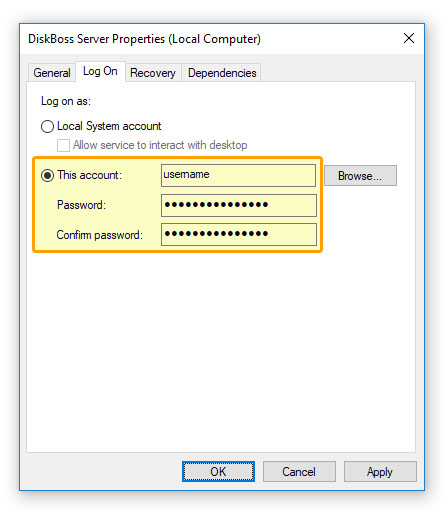
The configuration is very simple and may be performed within a couple of seconds using the following step-by-step guide:
Now, the DiskBoss service will run under the specified user account and will have exactly the same permissions as the specified user account when accessing network shares and NAS storage devices.
|
DiskBoss News
|