|
|
|
|
DiskBoss HEX Editor
DiskBoss includes a built-in HEX editor allowing one to view files and edit file data in the HEX and text modes. The HEX editor provides the ability to view and edit huge files while using a very small amount of system memory thus allowing one to work with large DVD image files and virtual machine disk image files sometimes reaching tens and hundreds of Gigabytes per file. When a file larger than 4 Gigabytes is opened, the HEX editor switches to the 64-Bit position display mode. 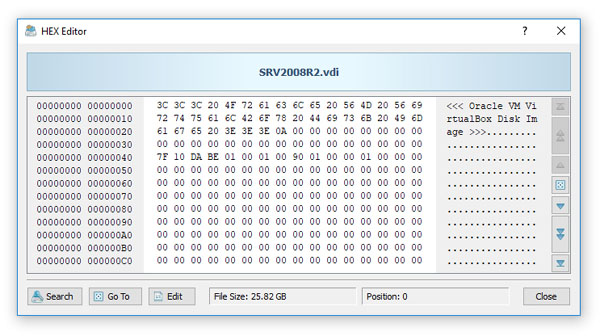
The DiskBoss HEX editor provides the ability to browse a file using navigation buttons located on the right side of the window, jump to a specific position in the file, search for binary or text patterns in the file and edit data in the binary or text modes. 
In order to search for a binary pattern, press the 'Search' button, enter the pattern as a series of bytes with each byte represented by two HEX characters. By default, the HEX editor will start searching from the current file position to the end of the file. If required, change the start/stop file positions on the search dialog. In order to search for a text string, change the search mode to 'Text' and enter a text string to search. 
In order to change one or more data bytes in the file, select the data bytes in the HEX display and press the 'Edit' button. In order to edit a text string, select the text string in the text display and press the 'Edit' button.
|
DiskBoss News
|